
git pull问题 git config pull.rebase false
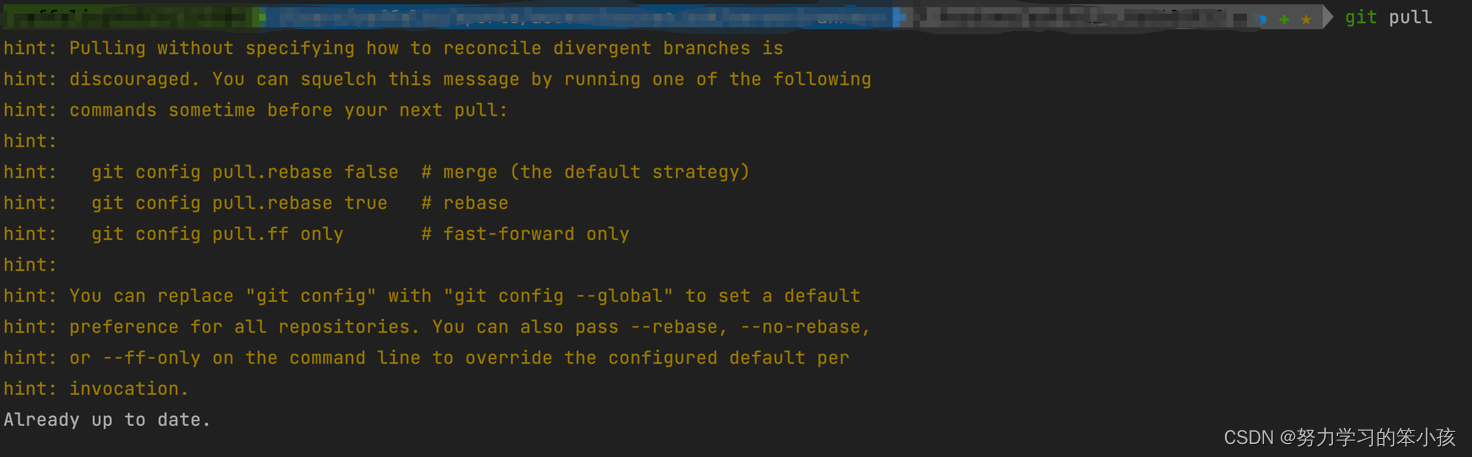
1 | You can replace "git config" with "git config --global" to set a default |
执行以下代码
1 | git config pull.rebase false |
git config pull.rebase false 作用
git config pull.rebase false的作用是设置 Git 在执行 git pull 命令时默认使用 merge 而不是 rebase。git pull命令是将远程分支的更新合并到本地分支,如果本地分支有更新,则会自动执行合并操作。默认情况下,
git pull命令会使用rebase的方式来合并分支。
使用rebase的好处是可以保持提交历史的线性,避免了 merge 产生的分支合并记录。但是,如果在多人协作的项目中使用rebase,可能会破坏提交历史,导致代码冲突,因此需要谨慎使用。通过设置
git config pull.rebase false,Git将默认使用merge的方式来合并分支,从而避免了rebase带来的潜在问题。 需要注意的是,如果在执行git pull命令时指定了--rebase选项,则 Git 会优先使用rebase的方式来合并分支,而不受git config pull.rebase的设置影响。因此,如果需要强制使用merge的方式来合并分支,可以在执行git pull命令时添加--no-rebase选项。
 微信
微信

相关推荐



评论